Note
This page was generated from pred_and_eval_ss.ipynb.
Note
If running outside of the Docker image, you may need to set some environment variables manually. You can do it like so:
import os
from subprocess import check_output

os.environ['GDAL_DATA'] = check_output('pip show rasterio | grep Location | awk \'{print $NF"/rasterio/gdal_data/"}\'', shell=True).decode().strip()
We will be accessing files on S3 in this notebook. Since those files are public, we set the AWS_NO_SIGN_REQUEST to tell rasterio to skip the sign-in.
[1]:
%env AWS_NO_SIGN_REQUEST=YES
env: AWS_NO_SIGN_REQUEST=YES
Prediction and Evaluation#
Load a Learner with a trained model from bundle – Learner.from_model_bundle()#
[2]:
bundle_uri = 's3://azavea-research-public-data/raster-vision/examples/model-zoo-0.31/spacenet-vegas-buildings-ss/train/model-bundle.zip'
[3]:
from rastervision.pytorch_learner import SemanticSegmentationLearner

learner = SemanticSegmentationLearner.from_model_bundle(bundle_uri, training=False)
INFO:matplotlib.font_manager:generated new fontManager
2024-08-07 14:02:43:rastervision.pytorch_learner.learner: INFO - Loading learner from bundle s3://azavea-research-public-data/raster-vision/examples/model-zoo-0.31/spacenet-vegas-buildings-ss/train/model-bundle.zip.
INFO:rastervision.pytorch_learner.learner:Loading learner from bundle s3://azavea-research-public-data/raster-vision/examples/model-zoo-0.31/spacenet-vegas-buildings-ss/train/model-bundle.zip.
2024-08-07 14:02:43:rastervision.pipeline.file_system.utils: INFO - Downloading s3://azavea-research-public-data/raster-vision/examples/model-zoo-0.31/spacenet-vegas-buildings-ss/train/model-bundle.zip to /opt/data/tmp/cache/s3/azavea-research-public-data/raster-vision/examples/model-zoo-0.31/spacenet-vegas-buildings-ss/train/model-bundle.zip...
INFO:rastervision.pipeline.file_system.utils:Downloading s3://azavea-research-public-data/raster-vision/examples/model-zoo-0.31/spacenet-vegas-buildings-ss/train/model-bundle.zip to /opt/data/tmp/cache/s3/azavea-research-public-data/raster-vision/examples/model-zoo-0.31/spacenet-vegas-buildings-ss/train/model-bundle.zip...
2024-08-07 14:02:52:rastervision.pytorch_learner.learner: INFO - Unzipping model-bundle to /opt/data/tmp/tmpfkl0s9yt/model-bundle
INFO:rastervision.pytorch_learner.learner:Unzipping model-bundle to /opt/data/tmp/tmpfkl0s9yt/model-bundle
Downloading: "https://download.pytorch.org/models/resnet50-11ad3fa6.pth" to /root/.cache/torch/hub/checkpoints/resnet50-11ad3fa6.pth
100%|██████████████████████████████████████████████████████████████████████████████| 97.8M/97.8M [00:02<00:00, 42.4MB/s]
2024-08-07 14:02:57:rastervision.pytorch_learner.learner: INFO - Loading model weights from: /opt/data/tmp/tmpfkl0s9yt/model-bundle/model.pth
INFO:rastervision.pytorch_learner.learner:Loading model weights from: /opt/data/tmp/tmpfkl0s9yt/model-bundle/model.pth
Note
If you used a custom model instead of using ModelConfig while training, you will need to initialize that model again and pass it to Learner.from_model_bundle(). See the Training a model tutorial for an example.
Get scene to predict#
[4]:
scene_id = 5631
image_uri = f's3://spacenet-dataset/spacenet/SN2_buildings/train/AOI_2_Vegas/PS-RGB/SN2_buildings_train_AOI_2_Vegas_PS-RGB_img{scene_id}.tif'
label_uri = f's3://spacenet-dataset/spacenet/SN2_buildings/train/AOI_2_Vegas/geojson_buildings/SN2_buildings_train_AOI_2_Vegas_geojson_buildings_img{scene_id}.geojson'
[10]:
from rastervision.core.data import ClassConfig

class_config = ClassConfig(
    names=['building', 'background'],
    colors=['orange', 'black'],
    null_class='background',
)
class_config.ensure_null_class()
Load stats that will be used to normalize the images before they are fed into the model:
[7]:
from rastervision.core.data import StatsTransformer

stats_uri = 's3://azavea-research-public-data/raster-vision/examples/model-zoo-0.31/spacenet-vegas-buildings-ss/analyze/stats/train_scenes/stats.json'
stats_tf = StatsTransformer.from_stats_json(stats_uri)
stats_tf
[7]:
StatsTransformer(means=array([424.87790094, 592.92457995, 447.27932498]), stds=array([220.60852518, 242.79340345, 148.50591309]), max_stds=3.0)
[11]:
from rastervision.pytorch_learner import SemanticSegmentationSlidingWindowGeoDataset

import albumentations as A

ds = SemanticSegmentationSlidingWindowGeoDataset.from_uris(
    class_config=class_config,
    image_uri=image_uri,
    image_raster_source_kw=dict(raster_transformers=[stats_tf]),
    size=325,
    stride=325,
    out_size=325,
)
2024-08-07 14:03:51:rastervision.pipeline.file_system.utils: INFO - Using cached file /opt/data/tmp/cache/s3/spacenet-dataset/spacenet/SN2_buildings/train/AOI_2_Vegas/PS-RGB/SN2_buildings_train_AOI_2_Vegas_PS-RGB_img5631.tif.
INFO:rastervision.pipeline.file_system.utils:Using cached file /opt/data/tmp/cache/s3/spacenet-dataset/spacenet/SN2_buildings/train/AOI_2_Vegas/PS-RGB/SN2_buildings_train_AOI_2_Vegas_PS-RGB_img5631.tif.
Predict – Learner.predict_dataset()#
Make predictions via Learner.predict_dataset() and then turn them into Labels via Labels.from_predictions() (specifically, SemanticSegmentationLabels.from_predictions()).
[12]:
from rastervision.core.data import SemanticSegmentationLabels

predictions = learner.predict_dataset(
    ds,
    raw_out=True,
    numpy_out=True,
    predict_kw=dict(out_shape=(325, 325)),
    progress_bar=True)

pred_labels = SemanticSegmentationLabels.from_predictions(
    ds.windows,
    predictions,
    smooth=True,
    extent=ds.scene.extent,
    num_classes=len(class_config))
Visualize predictions#
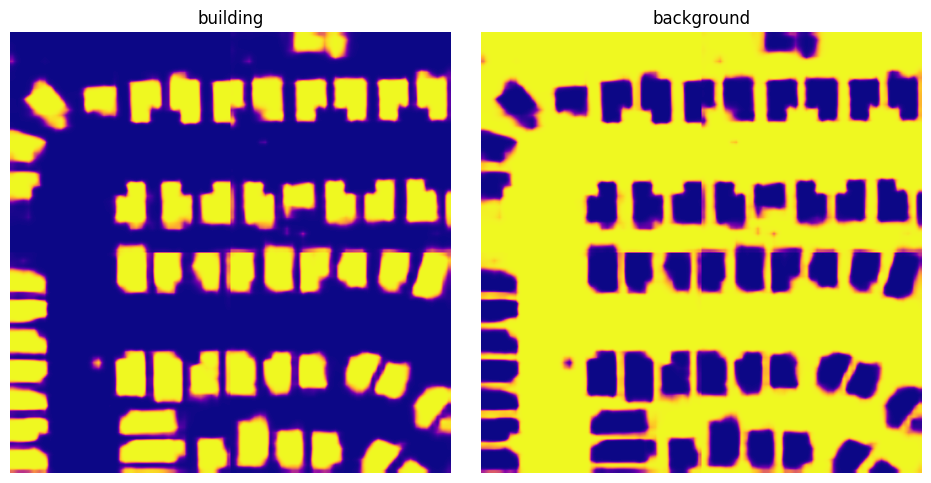
pred_labels is an instance of SemanticSegmentationSmoothLabels which is a raster of probability distributions for each pixel for the entire scene. We can get these probabilities via SemanticSegmentationSmoothLabels.get_score_arr().
Note
There is also a SemanticSegmentationSmoothLabels.get_label_arr() method that will return a 2D raster of class IDs representing the most probable class for each pixel.
[13]:
scores = pred_labels.get_score_arr(pred_labels.extent)
[14]:
from matplotlib import pyplot as plt

scores_building = scores[0]
scores_background = scores[1]

fig, (ax1, ax2) = plt.subplots(1, 2, figsize=(10, 5))
fig.tight_layout(w_pad=-2)
ax1.imshow(scores_building, cmap='plasma')
ax1.axis('off')
ax1.set_title('building')
ax2.imshow(scores_background, cmap='plasma')
ax2.axis('off')
ax2.set_title('background')
plt.show()
Save predictions to file – SemanticSegmentationSmoothLabels.save()#
[15]:
pred_labels.save(
    uri=f'data/spacenet-vegas-buildings-ss/predict/{scene_id}',
    crs_transformer=ds.scene.raster_source.crs_transformer,
    class_config=class_config)
Evaluate predictions#
We now want to evaluate the predictions against the ground truth labels.
Raster Vision allows us to do this via an Evaluator. In our case, this would be the SemanticSegmentationEvaluator. We are going to use its SemanticSegmentationEvaluator.evaluate_predictions() method, which takes both ground truth labels and predictions as Labels objects.
We already have the predictions as a SemanticSegmentationLabels object, so we just need to load the ground truth labels as SemanticSegmentationLabels too. We do that by using make_ss_scene() factory function to create a scene and then accessing scene.label_source.get_labels(). Alternatively, we could have directly created a SemanticSegmentationLabelSource.
[16]:
from rastervision.core.data.utils import make_ss_scene

scene = make_ss_scene(
    class_config=class_config,
    image_uri=image_uri,
    label_vector_uri=label_uri,
    label_vector_default_class_id=class_config.get_class_id('building'),
    label_raster_source_kw=dict(
        background_class_id=class_config.get_class_id('background')),
    image_raster_source_kw=dict(allow_streaming=True))

gt_labels = scene.label_source.get_labels()
2024-08-07 14:04:09:rastervision.pipeline.file_system.utils: INFO - Using cached file /opt/data/tmp/cache/s3/spacenet-dataset/spacenet/SN2_buildings/train/AOI_2_Vegas/geojson_buildings/SN2_buildings_train_AOI_2_Vegas_geojson_buildings_img5631.geojson.
INFO:rastervision.pipeline.file_system.utils:Using cached file /opt/data/tmp/cache/s3/spacenet-dataset/spacenet/SN2_buildings/train/AOI_2_Vegas/geojson_buildings/SN2_buildings_train_AOI_2_Vegas_geojson_buildings_img5631.geojson.
Note
gt_labels is an instance of SemanticSegmentationDiscreteLabels. You can convert it to a label raster (for visualization or some other analysis) via SemanticSegmentationDiscreteLabels.get_label_arr().
[17]:
from rastervision.core.evaluation import SemanticSegmentationEvaluator

evaluator = SemanticSegmentationEvaluator(class_config)

evaluation = evaluator.evaluate_predictions(
    ground_truth=gt_labels, predictions=pred_labels)
SemanticSegmentationEvaluator.evaluate_predictions() returns a SemanticSegmentationEvaluation object which contains evaluations for each class as ClassEvaluationItem objects.
We can examine these evaluations as shown below.
Evaluation for the building class:
[18]:
evaluation.class_to_eval_item[0]
[18]:
{'class_id': 0,
 'class_name': 'building',
 'conf_mat': [[288879.0, 12375.0], [9244.0, 112002.0]],
 'conf_mat_dict': {'FN': 9244.0, 'FP': 12375.0, 'TN': 288879.0, 'TP': 112002.0},
 'conf_mat_frac': [[0.6837372781065089, 0.029289940828402368],
                   [0.0218792899408284, 0.26509349112426034]],
 'conf_mat_frac_dict': {'FN': 0.0218792899408284,
                        'FP': 0.029289940828402368,
                        'TN': 0.6837372781065089,
                        'TP': 0.26509349112426034},
 'count_error': 3131.0,
 'gt_count': 121246.0,
 'metrics': {'f1': 0.9119829983348464,
             'precision': 0.9005041124966835,
             'recall': 0.9237583095524801,
             'sensitivity': 0.9237583095524801,
             'specificity': 0.958921707263638},
 'pred_count': 124377.0,
 'relative_frequency': 0.2869727810650888}
Evaluation for the background class:
[19]:
evaluation.class_to_eval_item[1]
[19]:
{'class_id': 1,
 'class_name': 'background',
 'conf_mat': [[112002.0, 9244.0], [12375.0, 288879.0]],
 'conf_mat_dict': {'FN': 12375.0, 'FP': 9244.0, 'TN': 112002.0, 'TP': 288879.0},
 'conf_mat_frac': [[0.26509349112426034, 0.0218792899408284],
                   [0.029289940828402368, 0.6837372781065089]],
 'conf_mat_frac_dict': {'FN': 0.029289940828402368,
                        'FP': 0.0218792899408284,
                        'TN': 0.26509349112426034,
                        'TP': 0.6837372781065089},
 'count_error': 3131.0,
 'gt_count': 301254.0,
 'metrics': {'f1': 0.9639308815653587,
             'precision': 0.9689926641017298,
             'recall': 0.958921707263638,
             'sensitivity': 0.958921707263638,
             'specificity': 0.9237583095524801},
 'pred_count': 298123.0,
 'relative_frequency': 0.7130272189349113}
Save evaluation#
We can also save the evaluations as a JSON via SemanticSegmentationEvaluation.save()
[20]:
evaluation.save(f'data/eval-{scene_id}.json')